> ## Documentation Index
> Fetch the complete documentation index at: https://docs.gradial.com/llms.txt
> Use this file to discover all available pages before exploring further.
# Sitecore XP Integration
> Connect Gradial's AI agents to Sitecore XP to automate content creation, updates, and publishing on your on-premises or managed environment.
Gradial connects to Sitecore XP by running a lightweight **Service Gateway** module inside your CM's IIS process. The gateway exposes a secured REST API at `/_api/gradial/*` that Gradial agents call to read items, apply edits, and trigger publishing — all without VPN tunnels, additional servers, or schema changes to your Sitecore databases.
Authentication uses short-lived JWT bearer tokens issued by your existing OIDC provider (Sitecore Identity Server or a third-party IdP like Azure AD, Okta, or Keycloak). Gradial exchanges a client secret for a token on every request, so no long-lived credentials are stored on the CM server.
This page covers the on-premises / managed **Sitecore XP** integration. For Sitecore XM Cloud or Content Hub, see the [Sitecore overview](/docs/integrations-administration-and-setup/integrations/sitecore-integration).
## What you'll need
* A **Sitecore XP 10.0–10.4** CM instance reachable over HTTPS
* **Administrator access** to the CM to install files and create a service user
* Access to your **OIDC provider** (Sitecore Identity Server or equivalent) to register a client
* A **Gradial account** with permission to create integrations under Settings → Integrations
The setup takes around 30 minutes for a straightforward deployment. Allow extra time if your environment uses split-horizon networking or a non-standard identity provider.
## Steps in this guide
| Section | What you'll do |
| ---------------------------------------------------------------------------- | ------------------------------------------------------------------------------------------------------------ |
| [1. Install the Service Gateway](#1-install-the-service-gateway-module) | Choose an install method (Sitecore package, WDP, or drop-in zip), then configure identity via the setup page |
| [2. Register the OIDC client](#2-register-gradial-as-an-oidc-client) | Create an API resource, scope, and client-credentials client in your IdP |
| [3. Service user permissions](#3-service-user-permissions) | Create a Sitecore user and grant item-level rights on the content tree |
| [4. Configuration reference](#4-module-configuration-reference) | Full reference for every gateway setting |
| [5. Create the integration in Gradial](#5-create-the-integration-in-gradial) | Enter the connection details and credentials in Gradial to go live |
When you are done, Gradial talks to your CM over HTTPS at `/_api/gradial/*`, authenticated by short-lived JWT bearer tokens issued by your OIDC provider via the client-credentials grant.
***
## 1. Install the Service Gateway module
The gateway ships as two DLLs and a config patch. It runs in-process inside the Sitecore CM IIS app domain — no separate service, no database changes, no schema updates.
**Supported versions:** Sitecore XP 10.0, 10.1, 10.2, 10.3, 10.4 (CM role).
Gradial provides the gateway in three formats. Pick the one that matches how you deploy Sitecore — all three land the same files in the CM webroot, after which you complete the shared [post-install steps](#after-installing-all-methods).
Best for a one-off manual install by a Sitecore administrator on a running CM.
**Artifact:** `Gradial.Gateway.Module--sc10.zip`
In the Sitecore Desktop, go to **Sitecore → Development Tools → Installation Wizard** (or **Control Panel → Administration → Install a package**).
Choose **Upload package**, select `Gradial.Gateway.Module--sc10.zip`, and upload it, then click **Next**.
Step through the wizard and click **Install**. The package writes the module binaries (`bin\Gradial.SitecoreXP.Gateway.*.dll`, `bin\Swashbuckle.Core.dll`) and the config patch (`App_Config\Include\Gradial\`) into the webroot. On an upgrade, accept the file-overwrite prompts.
If the wizard offers to restart the Sitecore client or application, allow it so the new assemblies load.
Best for automated CI/CD into Azure App Service or any Web Deploy–based pipeline. You download the package from your Gradial release and add it as a step in **your own** pipeline — Gradial does not deploy into your environment for you.
**Artifact:** `Gradial.Gateway.Module--sc10.scwdp.zip`
Download `Gradial.Gateway.Module--sc10.scwdp.zip` from your Gradial gateway release and store it alongside your other Sitecore deploy artifacts.
Add a Web Deploy step that syncs the package to your CM web app. In **Azure DevOps**, use the **Azure App Service deploy** task with the `.scwdp.zip` as the package. Or call `msdeploy` directly:
```bash theme={null}
msdeploy -verb:sync \
-source:package="Gradial.Gateway.Module--sc10.scwdp.zip" \
-dest:auto,computerName="https:///msdeploy.axd?site=",username="",password="",authtype="Basic"
```
Run the pipeline. Web Deploy lands the module binaries and config patch in the CM webroot and replaces any previous version cleanly on redeploy.
The WDP is built with the Sitecore Azure Toolkit and mirrors the same webroot layout as the other formats. It contains only the module binaries and configuration — no content items and no database changes.
Best when you deploy by copying files directly into the webroot (e.g. a scripted release).
**Artifact:** `Gradial.SitecoreXP.Gateway--sc10.zip`
Stop the Sitecore CM application pool before copying files.
Unzip `Gradial.SitecoreXP.Gateway--sc10.zip` into the Sitecore CM webroot (e.g. `C:\inetpub\wwwroot\\`). The archive mirrors the webroot layout:
* `bin\Gradial.SitecoreXP.Gateway.Core.dll`
* `bin\Gradial.SitecoreXP.Gateway.Sitecore10.dll`
* `bin\Swashbuckle.Core.dll`
* `App_Config\Include\Gradial\Gradial.CmGateway.config`
### After installing (all methods)
Once the files are in the webroot, finish the setup the same way regardless of install method:
This loads the gateway assemblies. `GET https:///_api/gradial/health` should now return `200 OK`. (Authenticated endpoints return `503` until you configure identity in the next step.)
If you get `404`, the gateway did not initialize — check the Sitecore log for `[Gradial.Gateway]` entries during app pool startup.
Browse to **`/sitecore/admin/Gradial.Setup.aspx`** on the CM (Sitecore administrator login required) and enter your OIDC values — **Authority**, **Expected audience**, **Allowed client IDs**, and **Required scopes** (from [Section 2](#2-register-gradial-as-an-oidc-client)); set the optional **Metadata address** / discovery options only for split-horizon setups. Click **Validate** to confirm the values are well-formed and that your identity provider's discovery document is reachable from the CM, then **Save**.
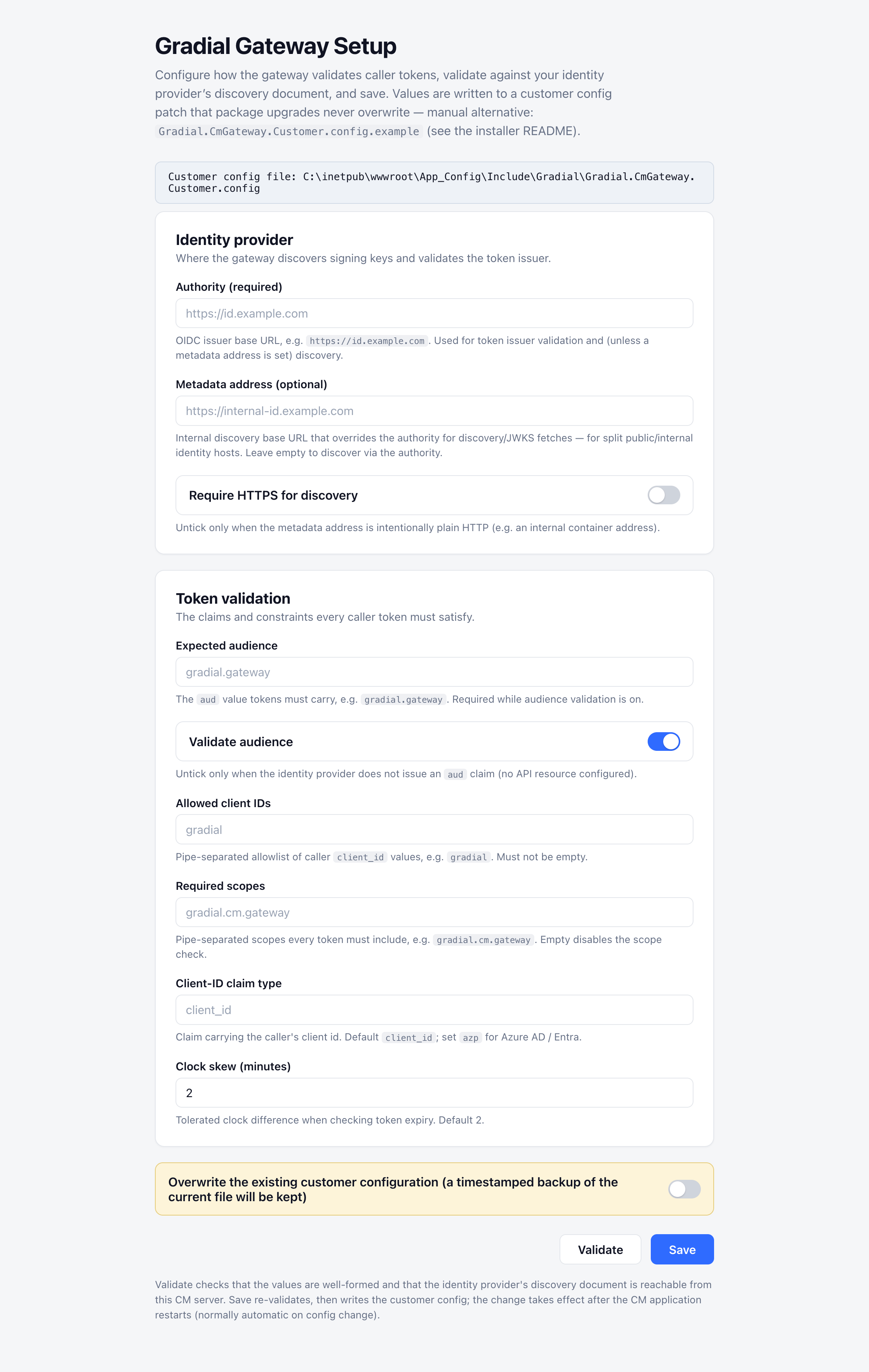 Save writes the values to `App_Config\Include\Gradial\Gradial.CmGateway.Customer.config` — a customer patch that **package upgrades never overwrite** — and the CM recycles automatically to apply them.
**Containerized CM (Docker / Kubernetes / any topology where the CM is recreated from an image):** the webroot — including `App_Config` — is an ephemeral container layer, so the file this page writes **does not survive a container recreate**. When it vanishes, gateway authentication breaks with `503 Identity provider unavailable`. On containers, treat this page as a **validation and smoke-test tool** (the Validate button's live discovery probe is still the fastest way to confirm the CM can reach your identity provider): make the durable configuration an `install-settings.json` on a persistent volume, or `GRADIAL_IDENTITY_*` environment variables in your compose file/manifest — both are re-applied automatically on every CM start.
Precedence note: when `install-settings.json` or `GRADIAL_IDENTITY_*` variables are present, they are authoritative on every CM start for the settings they supply — values saved through this page for those same settings are overwritten at the next app-pool recycle.
On a classic VM/IIS install the webroot is durable and this page is a perfectly good permanent configuration method.
Prefer configuration-as-code? You can supply the same identity values without the page: hand-edit the config patch (see [Section 4](#4-module-configuration-reference)), set `GRADIAL_IDENTITY_*` environment variables, or drop an `install-settings.json` in the Sitecore data folder — the last two are applied automatically on CM start. Non-identity settings such as `Gradial.Security.AllowedDatabases` are always edited in the config patch.
Create the Sitecore user referenced by `Gradial.Sitecore.ServiceUser` (default `sitecore\gradial-service`) and grant the item-level rights in [Section 3](#3-service-user-permissions).
Confirm `GET https:///_api/gradial/health` returns `200`, then run the [OIDC smoke test](#end-to-end-smoke-test) to confirm a real token is accepted.
### Uninstall
* **Sitecore package / drop-in zip:** stop the app pool, remove `bin\Gradial.SitecoreXP.Gateway.*.dll`, `bin\Swashbuckle.Core.dll`, and the entire `App_Config\Include\Gradial\` folder, then restart the app pool.
* **WDP:** remove the module step from your pipeline and redeploy, or delete the same files from the web app. The `Gradial.CmGateway.Customer.config` written by the setup page is not part of any package, so remove it by hand if you want the identity configuration gone too.
***
## 2. Register Gradial as an OIDC client
The gateway is an **OAuth 2.0 resource server** — it validates JWTs but never issues them. Token issuance is the job of your OIDC provider. You need to register three things there:
| Concept | Purpose |
| --------------------------- | ---------------------------------------------------------------------------------------------- |
| **API resource (audience)** | Identifies the gateway as a protected resource. The token's `aud` claim must match. |
| **API scope** | Permission name the caller must request to get a usable token. |
| **Client** | Gradial's identity. Has a `client_id` + `client_secret` and is authorized for the scope above. |
Gradial requests tokens with the **client credentials grant** and sends them on the `Authorization: Bearer ` header of every request.
### How the values map across the three sides
```
OIDC Provider Gateway config (Gradial.CmGateway.config)
───────────── ──────────────────────────────────────────
API resource "gradial.gateway" ───► Gradial.Identity.ExpectedAudience
API scope "gradial.cm.gateway" ───► Gradial.Identity.RequiredScopes
Client id "gradial" ───► Gradial.Identity.AllowedClientIds
Issuer URL https://id.example ───► Gradial.Identity.Authority
Discovery base URL ───► Gradial.Identity.MetadataAddress
(gateway appends /.well-known/openid-configuration;
leave empty to reuse Authority)
```
All four values must agree on both sides, or the gateway rejects tokens with `401`.
### Reference: Sitecore Identity Server
Sitecore Identity Server is based on IdentityServer4 and accepts XML patch files mounted into its container. A complete Gradial registration:
```xml theme={null}
gradial.gateway
Gradial CM Gateway
gradial.cm.gateway
gradial.cm.gateway
Gradial CM Gateway Access
gradial
Gradial Gateway Client
0
3600
true
false
client_credentials
$(env:GRADIAL_CLIENT_SECRET)
gradial.cm.gateway
```
Place this in the Identity container's config directory (typically `Config/production/` or via a mounted volume) and restart the container.
If you use a different OIDC provider (Azure AD, Okta, Auth0, Keycloak, etc.), the concepts are identical — register an API resource, an API scope, and a client-credentials client, then map the four values into the gateway's config.
### Split-horizon networks (internal vs. public issuer)
`MetadataAddress` exists for the case where **the ID server has a different internal origin than the JWT's public issuer URL**. In simple deployments where the CM can reach the same URL clients use, leave `MetadataAddress` empty and the gateway will derive everything from `Authority`.
This split is common in containerized deployments. For example:
* The Sitecore Identity container is reachable from the CM container at `http://id` (an internal Docker DNS name, plain HTTP).
* The same Identity service is reachable from the public internet at `https://id.example.com` (TLS, public DNS).
* Tokens issued to Gradial carry `iss: https://id.example.com` because that's the issuer the public clients trust.
In this case:
| Setting | Value | Why |
| ---------------------------------------- | ------------------------ | ------------------------------------------------------------------------------------------------------------------------------------------------------------------------------------------------------------------------------------------------------- |
| `Gradial.Identity.Authority` | `https://id.example.com` | Must match the JWT's `iss` claim. The gateway compares this string to the token's issuer during validation. |
| `Gradial.Identity.MetadataAddress` | `http://id` | Base URL the gateway uses to fetch the discovery document and signing keys. Use the internal hostname the CM container can actually reach. The gateway appends `/.well-known/openid-configuration` automatically — do **not** include that suffix here. |
| `Gradial.Identity.DiscoveryRequireHttps` | `false` | Required when `MetadataAddress` is plain HTTP. Leave `true` when both URLs are HTTPS. |
Sitecore patch form for `MetadataAddress`:
```xml theme={null}
http://id
```
Never set `Authority` to the internal URL. The gateway validates the token's `iss` claim against `Authority`, and the issuer baked into the token is the public URL — using the internal URL there will fail every token with a `401`.
### Generating the client secret
Use **32 bytes (256 bits) of cryptographic randomness**, base64-encoded.
PowerShell:
```powershell theme={null}
[Convert]::ToBase64String([System.Security.Cryptography.RandomNumberGenerator]::GetBytes(32))
```
OpenSSL:
```bash theme={null}
openssl rand -base64 32
```
Do not use GUIDs, `Get-Random`, or human-friendly password generators — they have insufficient entropy.
Store the plaintext secret in a secret manager. Inject it into the Identity container as an environment variable (the sample above reads `$(env:GRADIAL_CLIENT_SECRET)`). Provide the same plaintext value to Gradial when you create the integration.
### Rotating the secret
1. Generate a new secret.
2. Add it as `` alongside the existing one — IdentityServer4 accepts any configured secret, so old and new both work during rollover.
3. Update the integration in Gradial to use the new secret.
4. Once traffic has migrated, remove the old `` and restart the Identity container.
### End-to-end smoke test
```powershell theme={null}
$body = @{
client_id = "gradial"
client_secret = $env:GRADIAL_CLIENT_SECRET
grant_type = "client_credentials"
scope = "gradial.cm.gateway"
}
$token = (Invoke-RestMethod `
-Uri "https:///connect/token" `
-Method Post `
-Body $body).access_token
Invoke-RestMethod `
-Uri "https:///_api/gradial/whoami" `
-Headers @{ Authorization = "Bearer $token" }
```
A successful `/whoami` response returns the client identity extracted from the token.
***
## 3. Service user permissions
The gateway executes every Sitecore operation as the configured service user (`Gradial.Sitecore.ServiceUser`, default `sitecore\gradial-service`). The OIDC client identity authorizes Gradial to call the gateway; the Sitecore user is what actually reads and writes content in Sitecore. Sitecore's audit trail records this user, not the JWT caller — the gateway logs the JWT caller separately, with a correlation ID joining the two streams.
### Recommended rights
Grant the minimum item-level rights for the content roots the integration will operate against. Replace `[TENANT]` and `[SITE]` with your actual values; repeat for every tenant/site you want to expose.
| Path | Rights | Notes |
| ------------------------------------------------- | ----------------------------------- | ---------------------------------------------------------------------------------------------------------------------------------------------------------------- |
| `/sitecore/content/[TENANT]/[SITE]` | Read, Write, Create, Delete, Rename | Content tree the integration will manage. |
| `/sitecore/media library/Project/[TENANT]/[SITE]` | Read, Write, Create, Delete, Rename | Media items associated with the same site. |
| `/sitecore/templates` | Read | Required so the gateway can resolve field definitions when reading or creating items. **Do not grant Write** — content operations should never mutate templates. |
Apply rights with inheritance ("Descendants") so child items inherit them. Use the Sitecore Security Editor (**Desktop → Security Tools → Security Editor**), or assign the user to a role that carries these rights.
### Path-level access control
Path-level access control is enforced by:
1. The Sitecore ACLs above on the service user — anything outside the granted scope returns `403` from the underlying SDK.
2. The consuming application's allowed-paths configuration (set in Gradial).
Database-level access is enforced separately by the `Gradial.Security.AllowedDatabases` setting. Requests targeting a database outside the allowlist are rejected before any Sitecore call is made. The setting **fails closed** — an empty allowlist denies all requests.
***
## 4. Module configuration reference
All settings live in `App_Config\Include\Gradial\Gradial.CmGateway.config`. Most defaults are correct out of the box; only the identity values are required.
### Module
| Setting | Default | Description |
| ----------------- | ------- | ------------------------------------------------------------------------------------------------- |
| `Gradial.Enabled` | `true` | Master switch. When `false`, the initializer skips route registration and the gateway is dormant. |
### Identity (OIDC / JWT validation)
| Setting | Default | Description |
| ---------------------------------------- | -------------------- | --------------------------------------------------------------------------------------------------------------------------------------------------------------------------------------------------------------------------------------------------------------------------------------------------------------------------------------------------------------------------- |
| `Gradial.Identity.Authority` | *(empty — required)* | OIDC issuer URL. The token's `iss` claim must match. |
| `Gradial.Identity.ExpectedAudience` | *(empty — required)* | Value the token's `aud` claim must equal. |
| `Gradial.Identity.ValidateAudience` | `true` | Disable only for diagnostics. Keep `true` in production. |
| `Gradial.Identity.AllowedClientIds` | `gradial` | Pipe-separated list of client IDs allowed to call the gateway (e.g. `gradial\|tool-b`). The token's `client_id` claim must appear here. |
| `Gradial.Identity.RequiredScopes` | `gradial.cm.gateway` | Pipe-separated list of scopes the token must contain. |
| `Gradial.Identity.ClockSkewMinutes` | `2` | Allowance for clock drift between the OIDC issuer and CM server. |
| `Gradial.Identity.ClientIdClaimType` | `client_id` | Claim name used to read the client ID from the token. Override only if your provider emits a non-standard claim. |
| `Gradial.Identity.MetadataAddress` | *(empty)* | Base URL for OIDC discovery and JWKS fetches. The gateway appends `/.well-known/openid-configuration` itself, so the value is just an origin (e.g. `http://id`) — not a full discovery URL. Leave empty to reuse `Authority`. Set this only when the CM cannot reach `Authority` directly; see [Split-horizon networks](#split-horizon-networks-internal-vs-public-issuer). |
| `Gradial.Identity.DiscoveryRequireHttps` | `true` | Enforces HTTPS for the discovery endpoint. Only set `false` for local development against a non-TLS Identity host. |
### Sitecore execution context
| Setting | Default | Description |
| ---------------------------------- | -------------------------- | --------------------------------------------------------------------------------------------------------------------------------------- |
| `Gradial.Sitecore.ServiceUser` | `sitecore\gradial-service` | The Sitecore user every gateway operation runs as. Must exist before the app pool starts. See [Section 3](#3-service-user-permissions). |
| `Gradial.Sitecore.DefaultDatabase` | `master` | Database used when a request omits `?db=`. |
### Security
| Setting | Default | Description |
| ----------------------------------- | --------------------------------------------------------------------------- | ------------------------------------------------------------------------------------------------------------------------------------- |
| `Gradial.Security.AllowedDatabases` | `master` | Pipe-separated allowlist of databases the gateway may touch (e.g. `master\|web`). **Fails closed** — empty value denies all requests. |
| `Gradial.Security.DefaultFields` | *(empty)* | Pipe-separated list of fields always returned in item responses. Empty means "all fields except those denied". |
| `Gradial.Security.DeniedFields` | `__Security\|__Owner\|__Workflow state\|__Lock\|__Created by\|__Updated by` | Pipe-separated list of fields stripped from every response. |
### Feature settings
| Setting | Default | Description |
| ---------------------------------- | ------- | -------------------------------------------------------------------------------------- |
| `Gradial.Features.Preview.Enabled` | `true` | Enables the page preview rendering endpoints. Set `false` to disable preview entirely. |
### Preview rendering (HTTP loopback)
The preview endpoint renders a page by issuing an HTTP request back to the CM. These settings control that loopback.
| Setting | Default | Description |
| ----------------------------------------- | ------------------ | --------------------------------------------------------------------------------------------------------------------------- |
| `Gradial.Preview.CmBaseUrl` | `http://localhost` | Base URL preview requests target. If empty, preview derives the base URL from the incoming gateway request's scheme + host. |
| `Gradial.Preview.IgnoreCertificateErrors` | `false` | When `true`, the loopback HTTP client accepts self-signed and invalid TLS certs. **Only enable in non-production.** |
| `Gradial.Preview.RenderTimeoutSeconds` | `60` | Maximum time to wait for a loopback render before giving up. |
***
## 5. Create the integration in Gradial
With the gateway installed, the OIDC client registered, and the service user permissioned, you can now create the integration in Gradial.
### Connection
| Field | Value |
| ---------------------------- | ----------------------------------------------------------------------------------------------------------------------------------- |
| **Integration name** | A name for this connection (e.g. `Acme Production CM`). |
| **Description** *(optional)* | Free-text notes — environment, owner, ticket reference, etc. |
| **Sitecore CM URL** | Base URL of the CM instance, e.g. `https://cm.example.com`. Do **not** include `/_api/gradial`; Gradial appends that automatically. |
| **Mark as production** | Tick if this is a production CM. Gradial uses this flag to apply additional confirmation steps and audit emphasis. |
### Credential
These are the values you produced in [Section 2](#2-register-gradial-as-an-oidc-client).
| Field | Value | Maps to |
| ----------------- | ----------------------------------------------------------------------------------------------------------------- | ----------------------------------------------------------------- |
| **Client ID** | The client registered in your OIDC provider (e.g. `gradial`). | `` and `Gradial.Identity.AllowedClientIds`. |
| **Client Secret** | Plaintext secret you generated (32 bytes, base64). Store securely — Gradial will not display it again after save. | ``. |
| **Token URL** | Token endpoint of your OIDC provider, e.g. `https://id.example.com/connect/token`. | The `token_endpoint` published by the discovery document. |
| **Scope** | The scope the gateway requires. | `Gradial.Identity.RequiredScopes` (default `gradial.cm.gateway`). |
| **Audience** | The audience the gateway expects. | `Gradial.Identity.ExpectedAudience` (e.g. `gradial.gateway`). |
After saving, Gradial will fetch a token via the client-credentials grant and call `/_api/gradial/health` and `/_api/gradial/whoami` to verify the connection end-to-end.
***
## Failure modes
| HTTP status | Likely cause |
| ---------------------------------------------------- | -------------------------------------------------------------------------------------------------------------- |
| `401 Unauthorized` (every request) | `Authority` mismatch, signing key not loadable, or `ExpectedAudience` doesn't match the token's `aud` claim. |
| `403 Forbidden` with `insufficient_scope` | Token doesn't include a scope listed in `RequiredScopes`. |
| `403 Forbidden` with `client not allowed` | Client ID isn't in `AllowedClientIds`. |
| `403 Forbidden` on item operations | Service user lacks the required rights on the requested path. Review [Section 3](#3-service-user-permissions). |
| `503 Service Unavailable` on authenticated endpoints | `Authority` is empty or the gateway can't reach the discovery document at `MetadataAddress`. |
| `404 Not Found` on `/_api/gradial/*` | Gateway didn't initialize. Check the Sitecore log for `[Gradial.Gateway]` errors during app pool startup. |
All gateway log entries are tagged `[Gradial.Gateway]` and include a correlation ID. When opening a support case, include the correlation ID from the failed request's `X-Correlation-Id` response header.
Save writes the values to `App_Config\Include\Gradial\Gradial.CmGateway.Customer.config` — a customer patch that **package upgrades never overwrite** — and the CM recycles automatically to apply them.
**Containerized CM (Docker / Kubernetes / any topology where the CM is recreated from an image):** the webroot — including `App_Config` — is an ephemeral container layer, so the file this page writes **does not survive a container recreate**. When it vanishes, gateway authentication breaks with `503 Identity provider unavailable`. On containers, treat this page as a **validation and smoke-test tool** (the Validate button's live discovery probe is still the fastest way to confirm the CM can reach your identity provider): make the durable configuration an `install-settings.json` on a persistent volume, or `GRADIAL_IDENTITY_*` environment variables in your compose file/manifest — both are re-applied automatically on every CM start.
Precedence note: when `install-settings.json` or `GRADIAL_IDENTITY_*` variables are present, they are authoritative on every CM start for the settings they supply — values saved through this page for those same settings are overwritten at the next app-pool recycle.
On a classic VM/IIS install the webroot is durable and this page is a perfectly good permanent configuration method.
Prefer configuration-as-code? You can supply the same identity values without the page: hand-edit the config patch (see [Section 4](#4-module-configuration-reference)), set `GRADIAL_IDENTITY_*` environment variables, or drop an `install-settings.json` in the Sitecore data folder — the last two are applied automatically on CM start. Non-identity settings such as `Gradial.Security.AllowedDatabases` are always edited in the config patch.
Create the Sitecore user referenced by `Gradial.Sitecore.ServiceUser` (default `sitecore\gradial-service`) and grant the item-level rights in [Section 3](#3-service-user-permissions).
Confirm `GET https:///_api/gradial/health` returns `200`, then run the [OIDC smoke test](#end-to-end-smoke-test) to confirm a real token is accepted.
### Uninstall
* **Sitecore package / drop-in zip:** stop the app pool, remove `bin\Gradial.SitecoreXP.Gateway.*.dll`, `bin\Swashbuckle.Core.dll`, and the entire `App_Config\Include\Gradial\` folder, then restart the app pool.
* **WDP:** remove the module step from your pipeline and redeploy, or delete the same files from the web app. The `Gradial.CmGateway.Customer.config` written by the setup page is not part of any package, so remove it by hand if you want the identity configuration gone too.
***
## 2. Register Gradial as an OIDC client
The gateway is an **OAuth 2.0 resource server** — it validates JWTs but never issues them. Token issuance is the job of your OIDC provider. You need to register three things there:
| Concept | Purpose |
| --------------------------- | ---------------------------------------------------------------------------------------------- |
| **API resource (audience)** | Identifies the gateway as a protected resource. The token's `aud` claim must match. |
| **API scope** | Permission name the caller must request to get a usable token. |
| **Client** | Gradial's identity. Has a `client_id` + `client_secret` and is authorized for the scope above. |
Gradial requests tokens with the **client credentials grant** and sends them on the `Authorization: Bearer ` header of every request.
### How the values map across the three sides
```
OIDC Provider Gateway config (Gradial.CmGateway.config)
───────────── ──────────────────────────────────────────
API resource "gradial.gateway" ───► Gradial.Identity.ExpectedAudience
API scope "gradial.cm.gateway" ───► Gradial.Identity.RequiredScopes
Client id "gradial" ───► Gradial.Identity.AllowedClientIds
Issuer URL https://id.example ───► Gradial.Identity.Authority
Discovery base URL ───► Gradial.Identity.MetadataAddress
(gateway appends /.well-known/openid-configuration;
leave empty to reuse Authority)
```
All four values must agree on both sides, or the gateway rejects tokens with `401`.
### Reference: Sitecore Identity Server
Sitecore Identity Server is based on IdentityServer4 and accepts XML patch files mounted into its container. A complete Gradial registration:
```xml theme={null}
gradial.gateway
Gradial CM Gateway
gradial.cm.gateway
gradial.cm.gateway
Gradial CM Gateway Access
gradial
Gradial Gateway Client
0
3600
true
false
client_credentials
$(env:GRADIAL_CLIENT_SECRET)
gradial.cm.gateway
```
Place this in the Identity container's config directory (typically `Config/production/` or via a mounted volume) and restart the container.
If you use a different OIDC provider (Azure AD, Okta, Auth0, Keycloak, etc.), the concepts are identical — register an API resource, an API scope, and a client-credentials client, then map the four values into the gateway's config.
### Split-horizon networks (internal vs. public issuer)
`MetadataAddress` exists for the case where **the ID server has a different internal origin than the JWT's public issuer URL**. In simple deployments where the CM can reach the same URL clients use, leave `MetadataAddress` empty and the gateway will derive everything from `Authority`.
This split is common in containerized deployments. For example:
* The Sitecore Identity container is reachable from the CM container at `http://id` (an internal Docker DNS name, plain HTTP).
* The same Identity service is reachable from the public internet at `https://id.example.com` (TLS, public DNS).
* Tokens issued to Gradial carry `iss: https://id.example.com` because that's the issuer the public clients trust.
In this case:
| Setting | Value | Why |
| ---------------------------------------- | ------------------------ | ------------------------------------------------------------------------------------------------------------------------------------------------------------------------------------------------------------------------------------------------------- |
| `Gradial.Identity.Authority` | `https://id.example.com` | Must match the JWT's `iss` claim. The gateway compares this string to the token's issuer during validation. |
| `Gradial.Identity.MetadataAddress` | `http://id` | Base URL the gateway uses to fetch the discovery document and signing keys. Use the internal hostname the CM container can actually reach. The gateway appends `/.well-known/openid-configuration` automatically — do **not** include that suffix here. |
| `Gradial.Identity.DiscoveryRequireHttps` | `false` | Required when `MetadataAddress` is plain HTTP. Leave `true` when both URLs are HTTPS. |
Sitecore patch form for `MetadataAddress`:
```xml theme={null}
http://id
```
Never set `Authority` to the internal URL. The gateway validates the token's `iss` claim against `Authority`, and the issuer baked into the token is the public URL — using the internal URL there will fail every token with a `401`.
### Generating the client secret
Use **32 bytes (256 bits) of cryptographic randomness**, base64-encoded.
PowerShell:
```powershell theme={null}
[Convert]::ToBase64String([System.Security.Cryptography.RandomNumberGenerator]::GetBytes(32))
```
OpenSSL:
```bash theme={null}
openssl rand -base64 32
```
Do not use GUIDs, `Get-Random`, or human-friendly password generators — they have insufficient entropy.
Store the plaintext secret in a secret manager. Inject it into the Identity container as an environment variable (the sample above reads `$(env:GRADIAL_CLIENT_SECRET)`). Provide the same plaintext value to Gradial when you create the integration.
### Rotating the secret
1. Generate a new secret.
2. Add it as `` alongside the existing one — IdentityServer4 accepts any configured secret, so old and new both work during rollover.
3. Update the integration in Gradial to use the new secret.
4. Once traffic has migrated, remove the old `` and restart the Identity container.
### End-to-end smoke test
```powershell theme={null}
$body = @{
client_id = "gradial"
client_secret = $env:GRADIAL_CLIENT_SECRET
grant_type = "client_credentials"
scope = "gradial.cm.gateway"
}
$token = (Invoke-RestMethod `
-Uri "https:///connect/token" `
-Method Post `
-Body $body).access_token
Invoke-RestMethod `
-Uri "https:///_api/gradial/whoami" `
-Headers @{ Authorization = "Bearer $token" }
```
A successful `/whoami` response returns the client identity extracted from the token.
***
## 3. Service user permissions
The gateway executes every Sitecore operation as the configured service user (`Gradial.Sitecore.ServiceUser`, default `sitecore\gradial-service`). The OIDC client identity authorizes Gradial to call the gateway; the Sitecore user is what actually reads and writes content in Sitecore. Sitecore's audit trail records this user, not the JWT caller — the gateway logs the JWT caller separately, with a correlation ID joining the two streams.
### Recommended rights
Grant the minimum item-level rights for the content roots the integration will operate against. Replace `[TENANT]` and `[SITE]` with your actual values; repeat for every tenant/site you want to expose.
| Path | Rights | Notes |
| ------------------------------------------------- | ----------------------------------- | ---------------------------------------------------------------------------------------------------------------------------------------------------------------- |
| `/sitecore/content/[TENANT]/[SITE]` | Read, Write, Create, Delete, Rename | Content tree the integration will manage. |
| `/sitecore/media library/Project/[TENANT]/[SITE]` | Read, Write, Create, Delete, Rename | Media items associated with the same site. |
| `/sitecore/templates` | Read | Required so the gateway can resolve field definitions when reading or creating items. **Do not grant Write** — content operations should never mutate templates. |
Apply rights with inheritance ("Descendants") so child items inherit them. Use the Sitecore Security Editor (**Desktop → Security Tools → Security Editor**), or assign the user to a role that carries these rights.
### Path-level access control
Path-level access control is enforced by:
1. The Sitecore ACLs above on the service user — anything outside the granted scope returns `403` from the underlying SDK.
2. The consuming application's allowed-paths configuration (set in Gradial).
Database-level access is enforced separately by the `Gradial.Security.AllowedDatabases` setting. Requests targeting a database outside the allowlist are rejected before any Sitecore call is made. The setting **fails closed** — an empty allowlist denies all requests.
***
## 4. Module configuration reference
All settings live in `App_Config\Include\Gradial\Gradial.CmGateway.config`. Most defaults are correct out of the box; only the identity values are required.
### Module
| Setting | Default | Description |
| ----------------- | ------- | ------------------------------------------------------------------------------------------------- |
| `Gradial.Enabled` | `true` | Master switch. When `false`, the initializer skips route registration and the gateway is dormant. |
### Identity (OIDC / JWT validation)
| Setting | Default | Description |
| ---------------------------------------- | -------------------- | --------------------------------------------------------------------------------------------------------------------------------------------------------------------------------------------------------------------------------------------------------------------------------------------------------------------------------------------------------------------------- |
| `Gradial.Identity.Authority` | *(empty — required)* | OIDC issuer URL. The token's `iss` claim must match. |
| `Gradial.Identity.ExpectedAudience` | *(empty — required)* | Value the token's `aud` claim must equal. |
| `Gradial.Identity.ValidateAudience` | `true` | Disable only for diagnostics. Keep `true` in production. |
| `Gradial.Identity.AllowedClientIds` | `gradial` | Pipe-separated list of client IDs allowed to call the gateway (e.g. `gradial\|tool-b`). The token's `client_id` claim must appear here. |
| `Gradial.Identity.RequiredScopes` | `gradial.cm.gateway` | Pipe-separated list of scopes the token must contain. |
| `Gradial.Identity.ClockSkewMinutes` | `2` | Allowance for clock drift between the OIDC issuer and CM server. |
| `Gradial.Identity.ClientIdClaimType` | `client_id` | Claim name used to read the client ID from the token. Override only if your provider emits a non-standard claim. |
| `Gradial.Identity.MetadataAddress` | *(empty)* | Base URL for OIDC discovery and JWKS fetches. The gateway appends `/.well-known/openid-configuration` itself, so the value is just an origin (e.g. `http://id`) — not a full discovery URL. Leave empty to reuse `Authority`. Set this only when the CM cannot reach `Authority` directly; see [Split-horizon networks](#split-horizon-networks-internal-vs-public-issuer). |
| `Gradial.Identity.DiscoveryRequireHttps` | `true` | Enforces HTTPS for the discovery endpoint. Only set `false` for local development against a non-TLS Identity host. |
### Sitecore execution context
| Setting | Default | Description |
| ---------------------------------- | -------------------------- | --------------------------------------------------------------------------------------------------------------------------------------- |
| `Gradial.Sitecore.ServiceUser` | `sitecore\gradial-service` | The Sitecore user every gateway operation runs as. Must exist before the app pool starts. See [Section 3](#3-service-user-permissions). |
| `Gradial.Sitecore.DefaultDatabase` | `master` | Database used when a request omits `?db=`. |
### Security
| Setting | Default | Description |
| ----------------------------------- | --------------------------------------------------------------------------- | ------------------------------------------------------------------------------------------------------------------------------------- |
| `Gradial.Security.AllowedDatabases` | `master` | Pipe-separated allowlist of databases the gateway may touch (e.g. `master\|web`). **Fails closed** — empty value denies all requests. |
| `Gradial.Security.DefaultFields` | *(empty)* | Pipe-separated list of fields always returned in item responses. Empty means "all fields except those denied". |
| `Gradial.Security.DeniedFields` | `__Security\|__Owner\|__Workflow state\|__Lock\|__Created by\|__Updated by` | Pipe-separated list of fields stripped from every response. |
### Feature settings
| Setting | Default | Description |
| ---------------------------------- | ------- | -------------------------------------------------------------------------------------- |
| `Gradial.Features.Preview.Enabled` | `true` | Enables the page preview rendering endpoints. Set `false` to disable preview entirely. |
### Preview rendering (HTTP loopback)
The preview endpoint renders a page by issuing an HTTP request back to the CM. These settings control that loopback.
| Setting | Default | Description |
| ----------------------------------------- | ------------------ | --------------------------------------------------------------------------------------------------------------------------- |
| `Gradial.Preview.CmBaseUrl` | `http://localhost` | Base URL preview requests target. If empty, preview derives the base URL from the incoming gateway request's scheme + host. |
| `Gradial.Preview.IgnoreCertificateErrors` | `false` | When `true`, the loopback HTTP client accepts self-signed and invalid TLS certs. **Only enable in non-production.** |
| `Gradial.Preview.RenderTimeoutSeconds` | `60` | Maximum time to wait for a loopback render before giving up. |
***
## 5. Create the integration in Gradial
With the gateway installed, the OIDC client registered, and the service user permissioned, you can now create the integration in Gradial.
### Connection
| Field | Value |
| ---------------------------- | ----------------------------------------------------------------------------------------------------------------------------------- |
| **Integration name** | A name for this connection (e.g. `Acme Production CM`). |
| **Description** *(optional)* | Free-text notes — environment, owner, ticket reference, etc. |
| **Sitecore CM URL** | Base URL of the CM instance, e.g. `https://cm.example.com`. Do **not** include `/_api/gradial`; Gradial appends that automatically. |
| **Mark as production** | Tick if this is a production CM. Gradial uses this flag to apply additional confirmation steps and audit emphasis. |
### Credential
These are the values you produced in [Section 2](#2-register-gradial-as-an-oidc-client).
| Field | Value | Maps to |
| ----------------- | ----------------------------------------------------------------------------------------------------------------- | ----------------------------------------------------------------- |
| **Client ID** | The client registered in your OIDC provider (e.g. `gradial`). | `` and `Gradial.Identity.AllowedClientIds`. |
| **Client Secret** | Plaintext secret you generated (32 bytes, base64). Store securely — Gradial will not display it again after save. | ``. |
| **Token URL** | Token endpoint of your OIDC provider, e.g. `https://id.example.com/connect/token`. | The `token_endpoint` published by the discovery document. |
| **Scope** | The scope the gateway requires. | `Gradial.Identity.RequiredScopes` (default `gradial.cm.gateway`). |
| **Audience** | The audience the gateway expects. | `Gradial.Identity.ExpectedAudience` (e.g. `gradial.gateway`). |
After saving, Gradial will fetch a token via the client-credentials grant and call `/_api/gradial/health` and `/_api/gradial/whoami` to verify the connection end-to-end.
***
## Failure modes
| HTTP status | Likely cause |
| ---------------------------------------------------- | -------------------------------------------------------------------------------------------------------------- |
| `401 Unauthorized` (every request) | `Authority` mismatch, signing key not loadable, or `ExpectedAudience` doesn't match the token's `aud` claim. |
| `403 Forbidden` with `insufficient_scope` | Token doesn't include a scope listed in `RequiredScopes`. |
| `403 Forbidden` with `client not allowed` | Client ID isn't in `AllowedClientIds`. |
| `403 Forbidden` on item operations | Service user lacks the required rights on the requested path. Review [Section 3](#3-service-user-permissions). |
| `503 Service Unavailable` on authenticated endpoints | `Authority` is empty or the gateway can't reach the discovery document at `MetadataAddress`. |
| `404 Not Found` on `/_api/gradial/*` | Gateway didn't initialize. Check the Sitecore log for `[Gradial.Gateway]` errors during app pool startup. |
All gateway log entries are tagged `[Gradial.Gateway]` and include a correlation ID. When opening a support case, include the correlation ID from the failed request's `X-Correlation-Id` response header.